1. 그래프의 상태 업데이트
- HumanMessage : 사용자(사람)의 메시지
- AIMessage : AI(LLM)의 메시지
- AnyMessage : HumanMessage, AIMessage를 포함하는 메시지
!pip install langgraph
from langchain_core.messages import AnyMessage
from typing_extensions import TypedDict

class State(TypedDict):
    messages: list[AnyMessage]
    extra_field: int
from langchain_core.messages import AIMessage

def node(state: State):
    messages = state["messages"]
    new_message = AIMessage("안녕하세요! 무엇을 도와드릴까요?")

    # return {"messages": new_message, "extra_field": 10}
    return {"messages": messages + [new_message], "extra_field": 10}
from langgraph.graph import StateGraph

graph_builder = StateGraph(State)
graph_builder.add_node("node", node)
# set_entry_point : 그래프의 시작 노드를 지정하는 엣지 (START -> "node")
graph_builder.set_entry_point("node")
graph = graph_builder.compile()

graph
from langchain_core.messages import HumanMessage

result = graph.invoke({"messages": [HumanMessage("안녕")]})
result
result["messages"]
2. 대화메시지 상태 누적 업데이트
add_messages 는 기존 메시지에서 추가 메시지를 병합하는 데 사용하는 함수로, 새로 들어온 메시지를 추가할 때 사용할 수 있는 리듀서 역할
from typing_extensions import Annotated
from langgraph.graph.message import add_messages

class State(TypedDict):
    messages: Annotated[list[AnyMessage], add_messages]
    extra_field: int
def node(state: State):
    messages = state["messages"]
    new_message = AIMessage("안녕하세요! 무엇을 도와드릴까요?")

    return {"messages": new_message, "extra_field": 10}
from langgraph.graph import StateGraph

graph_builder = StateGraph(State)
graph_builder.add_node("node", node)
graph_builder.set_entry_point("node")
graph = graph_builder.compile()

graph
input_message = {"role": "user", "content": "안녕하세요."}

result = graph.invoke({"messages": [input_message]})

for message in result["messages"]:
# pretty_print()는 데이터나 객체를 보기 좋게(Pretty) 정리해서 출력하는 함수
    message.pretty_print()
result["messages"]
invoke : 하나의 요청에 대한 결과를 받을 때 까지 코드 실행 멈춤. 한번에 하나의 요청을 처리함
graph.invoke({"messages": [input_message]})
ainvoke : 비동기 처리로 여러 요청을 동시에 보낼 수 있음
await graph.ainvoke({"messages": [input_message]})
stream : 중간 결과를 실시간으로 반환함
- stream_mode="values" 각 단계의 현재 상태 값 출력
- Default) stream_mode="updates" 각 단계의 상태 업데이트만 출력
- stream_mode="messages" 각 단계의 메시지 출력
for chunk in graph.stream({"messages": [input_message]}, stream_mode="values"):
    print(chunk)
    for state_key, state_value in chunk.items():
        if state_key == "messages":
            state_value[-1].pretty_print()
for chunk in graph.stream({"messages": [input_message]}, stream_mode="updates"):
    print(chunk)
    for node, value in chunk.items():
        if node:
            print(node)
        if "messages" in value:
            print(value['messages'].content)
for chunk_msg, metadata in graph.stream({"messages": [input_message]}, stream_mode="messages"):
    print(chunk_msg)
    print(chunk_msg.content)
    print(metadata)
    print(metadata["langgraph_node"])
astream : 비동기 방식으로 스트리밍 처리
async for chunk_msg, metadata in graph.astream({"messages": [input_message]}, stream_mode="messages"):
    print(chunk_msg)
    print(chunk_msg.content)
    print(metadata)
    print(metadata["langgraph_node"])
3. 노드와 엣지 연결
from typing_extensions import TypedDict

class State(TypedDict):
    value_1: str
    value_2: int
def step_1(state: State):
    return {"value_1": state["value_1"]}

def step_2(state: State):
    current_value_1 = state["value_1"]
    return {"value_1": f"{current_value_1} b"}

def step_3(state: State):
    return {"value_2": 10}
from langgraph.graph import START, StateGraph

graph_builder = StateGraph(State)

# 노드 추가
graph_builder.add_node(step_1)
graph_builder.add_node(step_2)
graph_builder.add_node(step_3)

# 엣지 추가
graph_builder.add_edge(START, "step_1") # START ->1
graph_builder.add_edge("step_1", "step_2") # 1-> 2
graph_builder.add_edge("step_2", "step_3") # 2->3
graph = graph_builder.compile()
graph
graph.invoke({"value_1": "apple"})
4. 노드와 엣지를 한번에 연결
graph_builder = StateGraph(State).add_sequence([step_1, step_2, step_3])
graph_builder.add_edge(START, "step_1")

graph = graph_builder.compile()

graph.invoke({"value_1": "c"})
5. 병렬로 연결
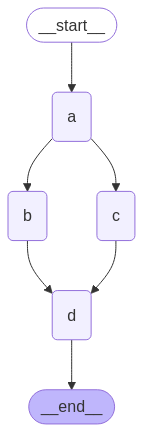
import operator
from typing import Annotated, Any
from typing_extensions import TypedDict
from langgraph.graph import StateGraph, START, END

class State(TypedDict):
    aggregate: Annotated[list, operator.add] # 업데이트 값이 뒤에 추가되도록 하는 operator.add 리듀서
def a(state: State):
    print(f'Adding "A" to {state["aggregate"]}')
    return {"aggregate": ["A"]}

def b(state: State):
    print(f'Adding "B" to {state["aggregate"]}')
    return {"aggregate": ["B"]}

def c(state: State):
    print(f'Adding "C" to {state["aggregate"]}')
    return {"aggregate": ["C"]}

def d(state: State):
    print(f'Adding "D" to {state["aggregate"]}')
    return {"aggregate": ["D"]}
graph_builder = StateGraph(State)

# 노드 추가
graph_builder.add_node(a)
graph_builder.add_node(b)
graph_builder.add_node(c)
graph_builder.add_node(d)
# 엣지 추가
graph_builder.add_edge(START, "a")
graph_builder.add_edge("a", "b") # a -> b
graph_builder.add_edge("a", "c") # a -> c
graph_builder.add_edge("b", "d") # b -> d
graph_builder.add_edge("c", "d") # c -> d
graph_builder.add_edge("d", END)
graph = graph_builder.compile()

graph
graph.invoke({"aggregate":[]})
6. 조건부 엣지 병렬 연결

import operator
from typing import Annotated, Sequence
from typing_extensions import TypedDict
from langgraph.graph import StateGraph, START, END

class State(TypedDict):
    aggregate: Annotated[list, operator.add]
    which: str
def a(state: State):
    print(f'Adding "A" to {state["aggregate"]}')
    return {"aggregate": ["A"]}

def b(state: State):
    print(f'Adding "B" to {state["aggregate"]}')
    return {"aggregate": ["B"]}

def c(state: State):
    print(f'Adding "C" to {state["aggregate"]}')
    return {"aggregate": ["C"]}

def d(state: State):
    print(f'Adding "D" to {state["aggregate"]}')
    return {"aggregate": ["D"]}

def e(state: State):
    print(f'Adding "E" to {state["aggregate"]}')
    return {"aggregate": ["E"]}
graph_builder = StateGraph(State)
graph_builder.add_node(a)
graph_builder.add_node(b)
graph_builder.add_node(c)
graph_builder.add_node(d)
graph_builder.add_node(e)
graph_builder.add_edge(START, "a")
# bc 혹은 cd 로 라우트를 결정하는 함수
def route_bc_or_cd(state: State) -> Sequence[str]:
    if state["which"] == "cd":
        return ["c", "d"]
    return ["b", "c"]

intermediates = ["b", "c", "d"]
graph_builder.add_conditional_edges(
    "a",
    route_bc_or_cd,
    intermediates,
)
for node in intermediates:
    graph_builder.add_edge(node, "e")

graph_builder.add_edge("e", END)
graph = graph_builder.compile()
graph
graph.invoke({"aggregate": [], "which": "bc"})
graph.invoke({"aggregate": [], "which": "cd"})
7. 조건과 반복
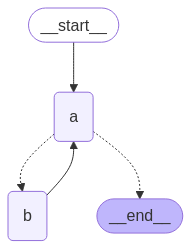
import operator
from typing import Annotated
from typing_extensions import TypedDict
from langgraph.graph import StateGraph, START, END

class State(TypedDict):
    aggregate: Annotated[list, operator.add]
def a(state: State):
    print(f'Node A 처리 중 현재 상태값 : {state["aggregate"]}')
    return {"aggregate": ["A"]}


def b(state: State):
    print(f'Node B 처리 중 현재 상태값 : {state["aggregate"]}')
    return {"aggregate": ["B"]}


graph_builder = StateGraph(State)
graph_builder.add_node(a)
graph_builder.add_node(b)
def route(state: State):
    if len(state["aggregate"]) < 7:
        return "b"
    else:
        return END


graph_builder.add_edge(START, "a")
graph_builder.add_conditional_edges("a", route)
graph_builder.add_edge("b", "a")
graph = graph_builder.compile()
import requests, zlib, base64
from IPython.display import Image

# Mermaid 코드 추출
code = graph.get_graph().draw_mermaid()

# 압축·인코딩 후 Kroki 요청
encoded = base64.urlsafe_b64encode(zlib.compress(code.encode())).decode()
url = f"https://kroki.io/mermaid/png/{encoded}"
resp = requests.get(url)
display(Image(resp.content))
graph.invoke({"aggregate": []})
from langgraph.errors import GraphRecursionError
# GraphRecursionError 로 에러를 반환하는 방법
try:
    graph.invoke({"aggregate": []}, config={"recursion_limit": 4})
except GraphRecursionError: # 반복 종료 조건에 도달할 수 없는 경우
    print("Recursion Error")
8. 조건에 따른 반복 처리하기

import operator
from typing import Annotated, Literal
from typing_extensions import TypedDict
from langgraph.graph import StateGraph, START, END

class State(TypedDict):
    aggregate: Annotated[list, operator.add]
def a(state: State):
    print(f'Node A 처리 중 현재 상태값 : {state["aggregate"]}')
    return {"aggregate": ["A"]}

def b(state: State):
    print(f'Node B 처리 중 현재 상태값 : {state["aggregate"]}')
    return {"aggregate": ["B"]}

def c(state: State):
    print(f'Node C 처리 중 현재 상태값 : {state["aggregate"]}')
    return {"aggregate": ["C"]}

def d(state: State):
    print(f'Node D 처리 중 현재 상태값 : {state["aggregate"]}')
    return {"aggregate": ["D"]}

graph_builder = StateGraph(State)
graph_builder.add_node(a)
graph_builder.add_node(b)
graph_builder.add_node(c)
graph_builder.add_node(d)
def route(state: State) -> Literal["b", END]:
    if len(state["aggregate"]) < 7:
        return "b"
    else:
        return END


graph_builder.add_edge(START, "a")
graph_builder.add_conditional_edges("a", route)
graph_builder.add_edge("b", "c")
graph_builder.add_edge("b", "d")
graph_builder.add_edge(["c", "d"], "a")
graph = graph_builder.compile()
result = graph.invoke({"aggregate": []})
9. 사용자 입력에 따른 반복 조건 설정
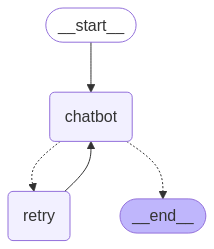
from typing import Annotated
from typing_extensions import TypedDict
from langgraph.graph import StateGraph, START, END
from langchain_core.messages import AIMessage, HumanMessage
from langgraph.graph.message import add_messages

class State(TypedDict):
    human_messages: Annotated[list[HumanMessage], add_messages]
    ai_messages: Annotated[list[AIMessage], add_messages]
    retry_num : int
def chatbot(state:State):
    retry_num = state["retry_num"]
    user_input = input(f"(현재 {retry_num}번째 답변) 사용자 입력: ")
    ai_message = AIMessage(f"{retry_num}번째 답변중!")

    return {"human_messages": [HumanMessage(content=user_input)], "ai_messages": [ai_message]}

def retry(state: State):
    return {"retry_num" : state["retry_num"] + 1}

graph_builder = StateGraph(State)
graph_builder.add_node("chatbot", chatbot)
graph_builder.add_node("retry", retry)
def route(state: State):
    if "반복" in state["human_messages"][-1].content:
        return "retry"
    else:
        return END


graph_builder.add_edge(START, "chatbot")
graph_builder.add_conditional_edges("chatbot", route)
graph_builder.add_edge("retry", "chatbot")
graph = graph_builder.compile()
for chunk in graph.stream({"human_messages" : "반복", "retry_num": 0}, stream_mode="updates"):
    print(chunk)
    for node, value in chunk.items():
        if node:
            print(node)
        if "messages" in value:
            print(value['messages'].content)
graph.invoke({"human_messages" : "반복", "retry_num": 0})
'인공지능 > AI Agent' 카테고리의 다른 글
| 벡터 데이터베이스 (0) | 2025.09.17 |
|---|---|
| 랭그래프 Reflection (0) | 2025.09.17 |
| 랭그래프를 이용한 간단한 챗봇 (1) | 2025.09.15 |
| 랭그래프 (0) | 2025.09.15 |
| AI Agent (0) | 2025.09.15 |